

Find what you see.
Please start with the FAQ questions below: most trouble is one of these. Each has the same label on every page, Q1 to Q10. Then the problems we know for this step, each with its cause and fix.
- Q6
Are both PCs on the same subnet, and able to reach each other?
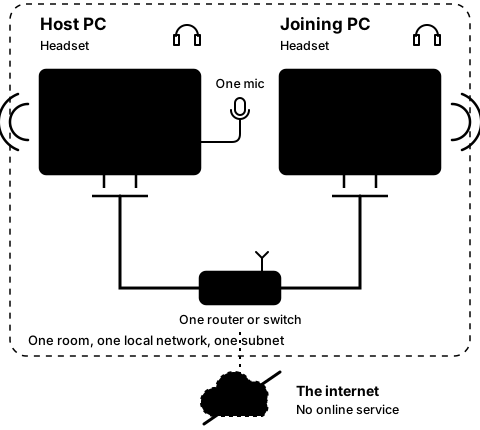
How to tell: CO-OP Comms is made for two PCs on the same subnet of one local network. The list of hosts stays on the local network: it reaches every PC on the same subnet (PCs plugged into the same router or switch), it never goes out to the WAN (the internet), and it does not pass between two separate subnets in one building. Compare the two addresses: each PC shows its own under This PC on its start screen. On most home and office networks, PCs on one subnet have addresses whose first three numbers match, such as 192.168.1.160 and 192.168.1.21; 192.168.1.160 and 192.168.5.40 are on different subnets. Matching numbers are not proof. Guest Wi-Fi, Wi-Fi that keeps devices apart ("AP isolation" or "client isolation"), separate VLANs, a DMZ, or a test lab that isolates each machine look the same in the numbers and still keep the PCs apart. The signs are in the windows: the host is hosting, but the joining PC's list stays empty after 10 seconds, and a typed address gets "No answer from …" after 8 seconds. On Wi-Fi, once linked, a grey line reads "This PC is on Wi-Fi. CO-OP Comms is made for wired Ethernet; over Wi-Fi, expect more delay and gaps in the sound."
What to do: Please plug both PCs into the same router or switch with a cable, on the main network, not a guest network. On a managed or test network, please ask your IT staff: "These two PCs need to reach each other directly on one local network: the same subnet, with no client isolation or firewall between them, and UDP ports 47800 and 47801 allowed both ways. Can you please put them there?" The rule: the list finds hosts on the same subnet only; typing the host PC's address is tried for any address, private or public, on another subnet too. It links when the network between the PCs lets UDP port 47800 through both ways; machines kept apart still will not connect. We test one subnet, and have not yet tried a typed join across a router.
On CO-OP Comms Client Only: Client Only has no "This PC" line. Its own address shows in the Network picker, such as "Ethernet · 192.168.1.21". Read the host's address from the host's "This PC" line.
Problems we know for step 3D
-
3D-1
The joining PC does not come back by itself.
- Why
- Leave was pressed on the joining PC in the meantime, which stops it trying; or the host PC's address changed, for example after the Wi-Fi reconnected.
- Fix
- Press Join again on the joining PC, or type the host PC's new address.
Still stuck after all of these?
Please tell us the build and the step: CO-OP Comms 0.2.2, draft build, Step 3D. Add the labels of the FAQ questions you tried, and what the screen says, word for word. That tells us exactly where you were.
Reply on the Steam review message thread for this build, or email benl@irontowerpress.com.