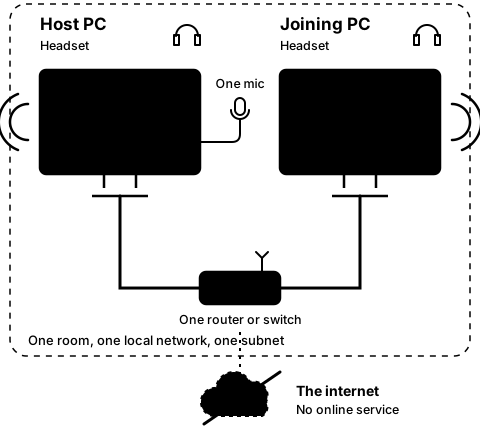
Two PCs in one room, on one router and one subnet. The internet sits outside the picture.
What you need
Two PCs side by side in one room, each plugged into the same router or switch with a cable, on the same subnet, with a closed-back headset on each. Wi-Fi is not supported: it may still link, with more delay and gaps. Install from the Steam library on both PCs.
Everything the test needs, in one list. Please tick each one as it is ready.
How the test is laid out
The test is 21 short steps in five stages: stage 1 on the host PC, stage 2 on the joining PC, stage 3 on both, then every control while linked (stage 4) and the start screen's extras (stage 5). Stages 1 to 3 are the main path; 4 and 5 try every other feature. Each step is one action, with a label such as 2C. If a step goes wrong, its Got stuck? page has the FAQ (Q1 to Q10) and what we know can go wrong there, each with its own label to quote back to us. Where these pages quote the app, the parts in angle brackets, such as host PC's address, are where your own name or address appears.
Words shaded like this stand for what your own screen shows there, such as your own user name or address.
In the pictures, "Tester 1" stands in for the host's Steam user name, "Tester 2" for the joining PC's, and "Tester 3" for a second host that is already busy. The addresses in them, 192.168.1.160 for the host PC and 192.168.1.21 for the joining PC, are examples; your windows show your own.
How to tell you are ready
All six are ready? Start with step 1A on the host PC.